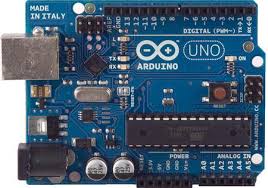

We are going to create several projects based on Arduino using different tools:HERE
Here's how to make a list:
We will start with the blinking code because it is a hello world example producing the LED to switch ON and OFF
Before the code we need to be sure that the Arduino board is recognize by the computer
When Arduino software is opened and the board is not recognized we need to go to device manager (administrador de dispositivos) found at Control Panele the Arduino. From the device manager we will see the Arduino Board with a question mark. After that we will use the right button to install the drivers found in the Arduino folder. Finally we need to check the ports and must be selected beforehand in the Arduino software.
It is also interesting to check the blinking code found in Arduino software under the example tab in order top be sure that our system Arduino-computer is working
  float note = 261.63;
 /* Int is an integrer variable, in Arduino variables we have diferent ways to call a variable, like char for characters, float means floating point numbers (decimals), long for every long numbers, boolean is a boolean variable containing to value true or false, byte is an integrer number form 0 to 255*/


 void setup() {
  pinMode(13, OUTPUT);
  pinMode(8, OUTPUT);
}
//Initialize the digital pin as an output because it could be also an input
// and we want an output because a LED needs output of energy to work

void loop() { // Here we call the functions to construct words and phrases.
  S();
  Lspace();
  O();
  Lspace();
  S();
  Lspace();
  Wspace();
  D();
  Lspace();
  A();
  Lspace();
  V();
  Lspace();
  I();
  Lspace();
  D();
  Wspace();

}

// We create functions for each letter that we went to use.
// Also we create one for the time between letters and between words.
void S() {
  digitalWrite(13, HIGH); // High means 255, the max. That controls the intensify of the LED
  delay(200); // That means the time between the digitalWrite. 200 = 1 sec
  tone(8, note); // That is the sound that the buzzer makes
  digitalWrite(13, LOW); // Low means 0, the min. That controls the intensify of the LED
  delay(200);
  noTone();
  digitalWrite(13, HIGH);
  delay(200);
  tone(8, note);
  digitalWrite(13, LOW);
  delay(200);
  noTone();
  digitalWrite(13, HIGH);
  delay(200);
  tone(8, note);
  digitalWrite(13, LOW);
  delay(200);
  noTone();
}

void O() {
  digitalWrite(13, HIGH);
  delay(600);
  tone(8, note);
  digitalWrite(13, LOW);
  delay(200);
  noTone();
  digitalWrite(13, HIGH);
  delay(600);
  tone(8, note);
  digitalWrite(13, LOW);
  delay(200);
  noTone();
  digitalWrite(13, HIGH);
  delay(600);
  tone(8, note);
  digitalWrite(13, LOW);
  delay(200);
  noTone();
}

void D() {
  digitalWrite(13, HIGH);
  delay(600);
  tone(8, note);
  digitalWrite(13, LOW);
  delay(200);
  noTone();
  digitalWrite(13, HIGH);
  delay(200);
  tone(8, note);
  digitalWrite(13, LOW);
  delay(200);
  noTone();
  digitalWrite(13, HIGH);
  delay(200);
  tone(8, note);
  digitalWrite(13, LOW);
  delay(200);
  noTone();
}

void A() {
  digitalWrite(13, HIGH);
  delay(200);
  tone(8, note);
  digitalWrite(13, LOW);
  delay(200);
  noTone();
  digitalWrite(13, HIGH);
  delay(600);
  tone(8, note);
  digitalWrite(13, LOW);
  delay(200);
  noTone();
}

void V () {
  digitalWrite(13, HIGH);
  delay(200);
  tone(8, note);
  digitalWrite(13, LOW);
  delay(200);
  noTone();
  digitalWrite(13, HIGH);
  delay(200);
  tone(8, note);
  digitalWrite(13, LOW);
  delay(200);
  noTone();
  digitalWrite(13, HIGH);
  delay(200);
  tone(8, note);
  digitalWrite(13, LOW);
  delay(200);
  noTone();
  digitalWrite(13, HIGH);
  delay(600);
  tone(8, note);
  digitalWrite(13, LOW);
  delay(200);
  noTone();

}


void I () {
  digitalWrite(13, HIGH);
  delay(200);
  tone(8, note);
  digitalWrite(13, LOW);
  delay(200);
  noTone();
  digitalWrite(13, HIGH);
  delay(200);
  tone(8, note);
  digitalWrite(13, LOW);
  delay(200);
  noTone();
}

void Lspace () {
  delay(600);
}

void Wspace () {
  delay(1400);
}
Find the rules of Morse code and create a function for S and for O using that rules